Object Array
On this page
Motivation
Array of objects is an efficient method to model a list of records. Compared to other alternative methods to model multiple records, object array excels in many aspects.
1D Array of Objects
When modeling a list of N records with M fields (a N * M 2D table), there are several data structures to choose from:
Multiple arrays
-
store data in
Marrays, each with sizeN, same index means same recordE.g. grades[i] and names[i] refers to the grade and name of a same student
const int NUM_STUDENT = 100; // max number of students double grades[NUM_STUDENT]; string names[NUM_STUDENT]; names[4] = "John Smith"; grades[4] = 100; cout << "The 5th student in the list " << names[4]; cout << " has a grade of " << grades[4]; -
old-fashion approach inherited from the C language
Array of objects
-
Pre-allocate
Nempty objects using the default constructor -
Each object has
Mfields -
Local array example:
// struct example struct StudentStruct { double grade; string name; }; StudentStruct students[NUM_STUDENT]; students[4].name = "John Smith"; students[4].grade = 100; cout << "The 5th student in the list " << students[4].name; cout << " has a grade of " << students[4].grade; // class example class StudentClass { double grade; string name; public: StudentClass(): name(""), grade(0) {} StudentClass(string name, double grade): name(name), grade(grade) {} string getName() { return name;} double getGrade() { return grade;} }; StudentClass students1[NUM_STUDENT]; // default constructor called 100 times students1[4] = StudentClass("John Smith", 100); // disposable object assignment cout << "The 5th student in the list " << students1[4].getName() << " has a grade of " << students1[4].getGrade(); -
To update the fields of the object after the initial allocation of empty objects, you can either
-
use assignment or setters:
// if name and grade fields are public
students[4].name = "John Smith";
students[4].grade = 100;

// if name and grade fields are accessible only through setters
students1[4].setName("John Smith");
students1[4].setGrade(100);
- fast, modifying existing objects
- can be very verbose given large number of fields
-
assign temporary object:
students1[4] = Student("John Smith", 100);
- overhead of creating and duplicating temporary objects
- cleaner syntax
-
-
Dynamic array example:
StudentClass *students2;
students2 = new StudentClass[NUM_STUDENT];
students1[4] = StudentClass("John Smith", 100);  // temporary object assignment
cout << "The 5th student in the list " << students1[4].getName() << " has a grade of " << students1[4].getGrade();
delete [] students2;
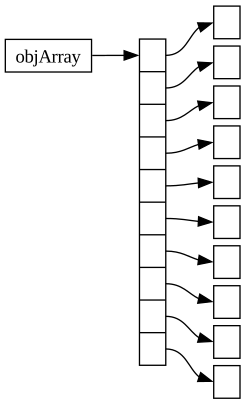
Array of pointers to objects
-
Pre-allocate
Npointers -
Initialized to
nullptr -
Use
newoperator to allocate objects as needed -
Each object has
Mfields -
Complex syntax than array of objects
-
Local array example:
StudentClass *students3[NUM_STUDENT]; // 100 pointers for (int i = 0; i < NUM_STUDENT; ++i) students3[i] = nullptr; students3[4] = new StudentClass("John Smith", 100); cout << "The 5th student in the list " << students3[4]->getName(); cout << " has a grade of " << students3[4]->getGrade(); // release memory for (int i = 0; i < NUM_STUDENT; ++i) delete students3[i]; // delete objects, no [] -
Dynamic array example:
StudentClass **students4;  // do not confuse with 2D array of objects
students4 = new StudentClass *[NUM_STUDENT];  // 100 pointers
for (int i = 0; i < NUM_STUDENT; ++i)
  students4[i] = nullptr;
students4[4] = new StudentClass("John Smith", 100);
cout << "The 5th student in the list " << students4[4]->getName();
cout << " has a grade of " << students4[4]->getGrade();

// release memory
for (int i = 0; i < NUM_STUDENT; ++i)
  delete students4[i];  // delete objects, no []
delete [] students4;
Pitfalls
-
mismatched assignment:
StudentClass students[10]; students[4] = new StudentClass("Mary Johnson", 100); // should have no 'new' operator -
wrong member accessing operator:
StudentClass *students[10]; students[4] = new StudentClass("Mary Johnson", 100); cout << students[4].getName() << endl; // should use -> given students[4] as a pointer -
confused
deleteanddelete [] -
not checking nullptr before delete