Data Structure and Algorithm Design II
Chapter 4
Xingang (Ian) Fang
Sections
B tree and variants
Introduction to problem and algorithm classification
Interactive reference: Connecting Problem Types to Algorithm Paradigms
B-Tree and Variants
Xingang (Ian) Fang
Outline
Overview
Operations
Variants
Overview
Invented by Bayer and McCreight (from Boeing Labs) in 1972.
A M-ary search tree that stores data in order.
A balanced tree with all leaves at the same level.
Definition: A B-tree of order \(m\) is a tree which satisfies the following properties:
Each node has at most \(m\) children.
Every node, except for the root and the leaves, has at least \(\lceil m/2 \rceil\) children.
The root node has at least two children unless it is a leaf.
All leaves appear on the same level.
Every non-leaf node with k children contains k−1 keys.
Every leaf node has at least \(\lceil m/2 \rceil - 1\) keys and at most \(m - 1\) keys.
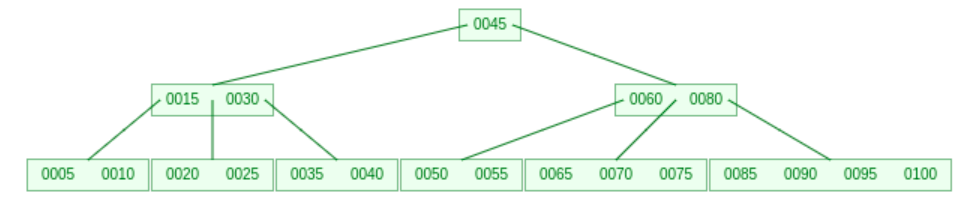
Operations: Search, Insertion
Search
Start at the root node.
Compare the key with the keys in the node.
If the key is found, return the node.
If the key is not found and the node is a leaf, return null.
If the key is not found and the node is not a leaf, go to the child pointer that points to the subtree that may contain the key.
Repeat until the key is found or a leaf node is reached.
Insertion
Start at the root node.
Find the leaf node where the key should be inserted.
If the node is not full, insert the key into the node.
If the node is full, split the node into two nodes.
Insert the median key into the parent node.
If the parent node is full, split the parent node.
Repeat until the root node is reached
Operations: Deletion
Search Stage: Search for the value to be deleted.
Deletion Stage: Delete the value.
If the value is in a leaf node, delete it.
If the value is in an internal node, replace it with its predecessor or successor and delete the predecessor or successor from the leaf node.
You will end up deleting from a leaf node.
Rebalance Stage:
If the leaf node is underflow (less than \(\lceil m/2 \rceil - 1\) keys):
If the left or right sibling has more than minimal number of keys, borrow a key from the sibling.
If both siblings have minimal number of keys, merge with a sibling. This step will take a key from the parent node and merge it with the sibling.
If the parent node is underflow after merge, repeat the process up to the root node.
The root node can have as few as 2 children.
Checkpoint Questions
Why does the root node may have a least 2 children instead of \(\lceil m/2 \rceil\) children?
Is insertion always happening at the leaf node?
Is deletion always happening at the leaf node?
What determines the time complexity of search, insertion, and deletion in a B-tree?
If the problem size is \(n\), what is the height of a B-tree of order \(m\)?
Checkpoint Solution
When the number of values is small, the root node must have less than \(\lceil m/2 \rceil\) children.
Insertion is always happening at the leaf node.
Deletion is not always happening at the leaf node.
The height of the B-tree determines the time complexity of search, insertion, and deletion.
The time complexity of search, insertion, and deletion in a B-tree is \(\Theta(\log_m n)\), where \(n\) is the number of keys in the tree.
Special Cases and Variants
Some common B-trees are:
Order 3 B Tree: a.k.a 2-3 Tree (2 or 3 children per internal node).
Order 4 B Tree: a.k.a 2-3-4 Tree (2, 3, or 4 children per internal node).
Enhancements and variants of B-trees:
B+ Tree: A B-tree of order \(m\) where all keys are stored in the leaves.
B* Tree
B# Tree

B+ Tree
Definition: A B+ tree of order \(m\) satisfies the following properties:
All data are stored in the leaves.
All leaves are linked together.
All internal nodes are duplicate keys only for faster search.
All internal nodes have between \(\lceil m/2 \rceil\) and \(m\) children.
All leaves have between \(\lceil m/2 \rceil - 1\) and \(m - 1\) keys.
Works well with sequential access.
Ideal for file system and database indexing.
Reduced number of disk accesses.
Reduced redistribution of data when inserting or deleting.
Checkpoint Questions 2
What is the difference between a B-tree and a B+ tree?
Why the sequential access is faster in a B+ tree?
Checkpoint Solution 2
In a B-tree, keys and data are stored in both internal nodes and leaf nodes. In a B+ tree, all data are stored in the leaf nodes, and internal nodes only store keys for faster search.
Sequential access is faster in a B+ tree because all leaf nodes are linked together, allowing for easy traversal of all keys in order.
Problem Classification
Xingang (Ian) Fang
Overview
Essential to understand the problem
Most problems can be solved by multiple algorithms
Many problems can be solved by similar algorithms
Essential to choose or design the algorithms to solve the problem
By The Goal
Find one solution that satisfies the requirements - search
Find all solutions that satisfy the requirements - enumeration
Find the best solution according to an objective - optimization
Determine whether at least one qualifying solution exists (yes/no) - decision
Count the qualifying solutions - counting
Find the output of a mathematical or logical function - evaluation problem
These labels describe the requested output, not the algorithm used. A problem may have several related formulations. Enumerating all solutions can be used to find one, decide whether any exist, count them, or select the best one, but an algorithm may solve those goals directly without enumerating every solution. Search asks for a witness; decision asks only whether a witness exists.
Algorithmic Classification
Xingang (Ian) Fang
Outline
Overview
Algorithmic Paradigms
TSP Example
Groups To Be Covered
Overview
Many ways to classify algorithms
In this course
algorithmic paradigms
Brute force
Backtracking
Divide and conquer
Dynamic programming
Greedy algorithms
data structure based algorithms
Self-balancing binary search tree related
Graph related
other groups
Randomized algorithms
Algorithmic Paradigms
Algorithmic Paradigm: Fundamental approaches, strategies, or methodologies used in the design and analysis of algorithms. These paradigms provide high-level templates or frameworks for solving various types of computational problems.
The choice of an algorithmic paradigm depends on the nature of the problem and the resources available to solve it.
Problem types describe the requested output; paradigms describe how an algorithm is designed. A paradigm is not tied to one problem type: its fit depends on the problem structure, required output, and whether exactness is required.
TSP Example
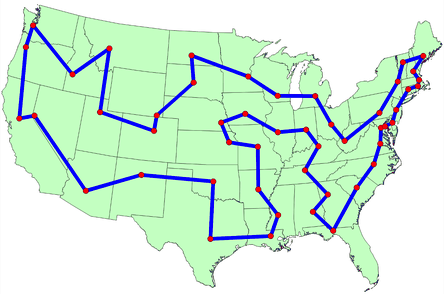
Given a list of cities and the distances or costs between each pair of cities, the goal of the Traveling Salesman Problem (TSP) is to find the shortest possible route that visits each city exactly once and returns to the starting city. This is an NP-hard problem!
Brute Force: Try all possible permutations of the cities and find the one with the minimum cost. \(\Theta((n-1)!)\)
Dynamic programming: Use a table to store the minimum cost of visiting a subset of cities.
Branch and bound: Use a tree to store the partial solutions and prune the branches that cannot lead to a better solution.
Greedy algorithms: Start with an empty tour and add the next closest city to the tour.
Metaheuristic algorithms: Genetic algorithms, simulated annealing, etc.
Paradigms To Be Covered
Brute Force
Exhaustive Search on all possible solutions.
No heuristic, no pruning, no optimization.
Only feasible for small problem instances.
Exact algorithms.
By checking every candidate, brute force can implement enumeration and derive search, decision, counting, or optimization answers. It may do more work than needed for those goals.
Examples: Combinations, Permutations, TSP, knapsack, etc.
Backtracking
Try out possibilities until a solution is found or all possibilities are exhausted.
Backtrack to the previous decision point if a partial solution cannot lead to a solution.
Examples: N-queens, Sudoku, graph coloring, etc.
Greedy
Make the locally optimal choice at each step.
Usually leads to a suboptimal solution.
Examples: Prim’s algorithm, Kruskal’s algorithm, Dijkstra’s algorithm, Huffman coding, etc.
Paradigms To Be Covered (cont’d)
Divide and Conquer
Divide the problem into smaller subproblems.
Solve the subproblems recursively.
Solves independent subproblems or ignore the dependency and overlapping factors.
Combine the solutions to the subproblems to obtain the solution to the original problem.
Examples: Merge sort, quick sort, binary search, etc.
Dynamic Programming
Divide the problem into smaller overlapping subproblems.
Systematically solve the subproblems and store the solutions in a table.
Top-down (recursive with memoization) or bottom-up (iterative).
Examples: Fibonacci numbers, knapsack, TSP, etc.
Other Groups To Be Covered
Self-balancing tree related
AVL tree
B-tree
Graph related
Minimum spanning tree
Shortest path
Randomized Algorithms
Introduce randomness into the algorithm.
Pseudo-random number generator and seed.
Examples: Genetic Algorithm, Randomized quick sort, Monte Carlo algorithms, Las Vegas algorithms, etc.